• There has been a recent cluster of spammers accessing BARFer accounts and posting spam. To safeguard your account, please consider changing your password. It would be even better to take the additional step of enabling 2 Factor Authentication (2FA) on your BARF account. Read more here.

Curved monitor for software development

If you're interested, click below. I'm happy to answer any questions you might have. :) I'll warn you as I wasn't, however, in the wise words of Morpheus...

This is your last chance. After this, there is no turning back. You don't click the link—the story ends, you wake up in your bed and use whatever keyboard you've been using. You click the link—you stay in Wonderland, and I show you how deep the rabbit hole goes. Remember: all I'm offering is the truth. Nothing more.

https://www.reddit.com/r/mechanicalkeyboards

:D

Very cool - I've got a 60% with blue cherrys, wife hates the noise, I love the feel.
 
Man, I thought I had a cool setup...

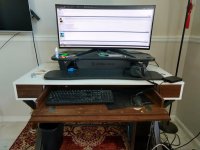
I have an Alienware 34 inch curved IPS monitor, and mechanical keyboard!

I do also like my Versa Desk, even though I use it like once a month...:laughing
 

Attachments

  • IMG_20200805_134617134_HDRa.jpg
    IMG_20200805_134617134_HDRa.jpg
    78.3 KB · Views: 46
Have had a sammy ultrawide for many years now. 34" i think. Only 60hz so id probably get something a bit different if i were doing it again but i love the format and next one will be a similar setup.
 
ultraawwiiiiiiiiiiide is the master race

i have a 34 alienware ultrawide
 
Have had a sammy ultrawide for many years now. 34" i think. Only 60hz so id probably get something a bit different if i were doing it again but i love the format and next one will be a similar setup.

60Hz is fine if you aren't gaming. I am kind of out of gaming on my PC so the 34 UW at 60Hz was a winner.
 
A friend of mine, who is an industry prominent software dev who does streaming and videos to produce educational content for developers, sent me this picture of her workstation the other day. I like the setup, I have to say. Dual curved 38" monitors and a 30" for video production.

47963156427_c19caa3f38_k.jpg
 
If I had the desk space / room for a desk that big, I'd love dual ultrawides instead of my current triple monitor setup, but...don't have the space really.
 
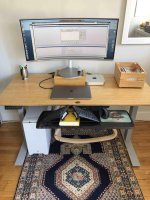
clean setup norcal. I too went out of my way to avoid having excessive amounts of "black shit" all over the place. The monitor stand is actually a box for tea storage, I ripped out the dividers and how it holds cables/power bricks.
 

Attachments

  • IMG_1310.jpg
    IMG_1310.jpg
    105.1 KB · Views: 40
TBH 60 Hz is still fine for gaming too. I'd say I average between 80-120 FPS, but I have a 165 Hz monitor so I'm still not pushing it to the limit. Most people aren't pushing their games even to 100 FPS and would be fine with a steady 60 FPS. I bought it keeping in mind that while the CPU / mobo / GPU / etc can be swapped out for a new build, a good monitor can far outlast the computer pushing it.
 
The response time on my 60hz sammy ultrawide panel is terrible. Granted there are plenty of 60hz tn panels with a quick response times but then they look like shit for other reasons.
 
TBH 60 Hz is still fine for gaming too. I'd say I average between 80-120 FPS, but I have a 165 Hz monitor so I'm still not pushing it to the limit. Most people aren't pushing their games even to 100 FPS and would be fine with a steady 60 FPS. I bought it keeping in mind that while the CPU / mobo / GPU / etc can be swapped out for a new build, a good monitor can far outlast the computer pushing it.

This is true but a monitor with a higher refresh rate will cut down ghosting and motion blur significantly.
 
Ended up going with 38inch LG monitor. Not the latest one with 1ms refresh rate, and thunderbolt, but previous gen. I won't be using it for gaming so refresh rate is not really that important. Being able to charge through monitor would have been nice, but not 2x nice.

Used it yesterday while working, and quite like it. Resolution is descent, and it's like having two monitors side by side.

Thanks for suggestions everyone.
 
One thing that amazes me is how clunky the sync/handshake between systems and monitors continues to be. I have 3 systems connected to my new monitor and switching output is still wonky as fuck. I use the usb-c, HDMI, and displayport input ports, and all 3 are glitchy and sometimes take a few seconds to sync, or sometimes require me to cycle the monitor off and on before the connection is established. I get that universal cross vendor compatibility is always a challenge but guys, you've had how many decades to get this figured out?
 
Last edited:
One thing that amazes me is how clunky the sync/handshake between systems and monitors continues to be. I have 3 systems connected to my new monitor and switching output is still wonky as fuck. I use the usb-c, HDMI, and displayport input ports, and all 3 are glitchy and sometimes take a few seconds to sync, or sometimes require me to cycle the monitor off and on before the connection is established. I get that universal cross vendor compatibility is always a challenge but guys, you've had how many decades to get this figured out?

my Mac does weird things all the time with my monitors, partly depending on whether or not the monitors turned themselves off or I turned them off. I ended up writing a script to reset the outputs and rotations. Its on a hotkey too, so its ez to run when things are wrong.
 
Ended up going with 38inch LG monitor. Not the latest one with 1ms refresh rate, and thunderbolt, but previous gen. I won't be using it for gaming so refresh rate is not really that important. Being able to charge through monitor would have been nice, but not 2x nice.

Used it yesterday while working, and quite like it. Resolution is descent, and it's like having two monitors side by side.

Thanks for suggestions everyone.
:thumbup
post a pic!
 
Nice. I have the same mouse and headphones :thumbup

Nice. I just got the mouse and keyboard. I used to use MS ergo ones, but they are not as compatible with mac. So far I like them.

Also really digging Bose 700. I have them for a year now, and it really helps me concentrate. Even at home.
 
Back
Top